
La Crosse View
La Crosse TechnologyWeather
2.87.65K Reviews
- Version
- 2.1.58-262d163a
- Installs
- 500.00K
- Age Rating
- Everyone
Screenshots
Our Review of La Crosse View
 Analysis by Appyee
I find a home weather station most useful when its readings help me make a decision, not simply when they give me another number to check. That is the idea behind La Crosse View: it brings readings from compatible La Crosse Technology equipment onto a phone, so I can check what is happening around a station without standing beside its display. If you already own one of these devices, that connection is the app’s main reason to exist. If you do not, it is not a general-purpose weather app I would choose just to get a forecast.
A phone companion for your own weather readings
La Crosse Technology makes weather stations and alert systems, and this free weather app is designed to work with that equipment. The distinction matters. A standard forecast app is built around broad location-based information; this one is most valuable when you want to see information collected by a station you have set up. I would think of it as an extension of that hardware rather than a replacement for every weather tool on your phone.
That focus can be genuinely useful at home. A forecast might tell me what conditions to expect in the area, while a connected station gives me a way to check the conditions recorded where the station is installed. Those are related but not identical questions. If I am deciding whether to bring plants in, dress for a walk, or check on the weather around a second property, a nearby reading can be more relevant than a broad regional snapshot.
What the connection changes in everyday use
The practical appeal is being able to check the station from somewhere else. Once the station is connected to Wi-Fi and paired with the app, I can use my phone to view its readings instead of relying on the station’s local screen. That makes the setup worthwhile for someone who checks conditions during the day, or who wants access while away from home. The app is tied to the station, though, so it only makes sense if you have compatible La Crosse equipment and are willing to get that hardware online.
One useful habit is to treat the station reading and a public forecast as two different inputs. I would use the station to understand the conditions at its location, then use a regular forecast app when I need a wider view of what may happen later or across a route. That division keeps the app in its lane and avoids expecting a personal weather station to answer every planning question. It also helps explain why this companion can be useful even if I already keep another weather app on my phone.
The alert option is another reason to keep the app set up after the initial novelty wears off. Notifications can make it easier to notice a condition or device update without opening the app repeatedly. I would choose alerts carefully, based on something that could actually change what I do; too many low-value notifications can make a weather tool feel like noise. For a household that checks conditions before outdoor chores, a well-chosen alert is more useful than a long list of readings nobody acts on.
Where it fits—and where it does not
For a realistic example, imagine I am away from home and wondering whether to leave outdoor work for later. A quick look at a connected station can give me a better sense of the conditions where it sits than a general report for a nearby town. If I manage more than one location, being able to check stations within the same app can also reduce the back-and-forth of using separate local displays. The important caveat is that this is only as useful as the station setup and the location it represents: a reading from one spot should not be treated as a guarantee about conditions everywhere nearby.
Compared with the usual free weather apps, La Crosse View is narrower but more personal. General-purpose alternatives are the better choice when I want forecasts for a destination, a quick city search, or weather information without buying and configuring a station. La Crosse View has the edge when I specifically want readings from my own compatible equipment. I would not install it as my only weather source if all I needed was a basic forecast, and I would not buy hardware solely on the assumption that the app will replace all the other ways I check the weather.
Getting started also involves more than downloading an app: the weather station needs to be connected to Wi-Fi and paired. That makes initial setup a real consideration, particularly if the station is in a spot with an unreliable connection or if the person who will use the app is not comfortable following device setup steps. I would do the pairing while near the equipment, take time to confirm it is reporting, and only then rely on remote checks. If it does not connect as expected, the first thing I would revisit is the station’s network and pairing process rather than assuming the phone app alone can provide readings.
First Impressions
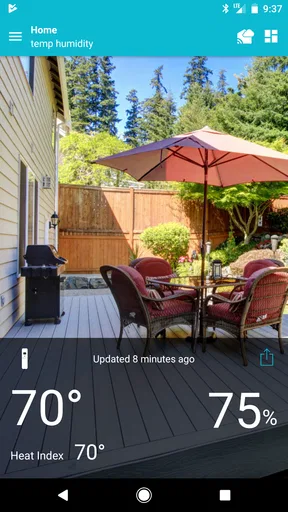
From the moment you open the La Crosse View app, it’s clear that the developers have prioritized user experience. The interface is clean and intuitive, which is a breath of fresh air if you’ve ever struggled with clunky weather apps in the past. The dashboard is organized with everything you need at a glance: current conditions, forecasts, and even a customizable view of your connected devices.
Setting up the app is a breeze. Once you’ve connected your weather station to Wi-Fi, syncing with the app is straightforward. You just need to follow the on-screen instructions, and voila, you're ready to start weather tracking like a pro.
Features That Stand Out
Now, let’s talk features, because this app has quite a few tricks up its sleeve. The real-time data is a game changer. You get access to temperature, humidity, wind speed, and other essential weather metrics, all updated in real time. And the best part? You can view this data from anywhere, whether you’re lounging at home or on vacation halfway around the world.
Another feature that I absolutely love is the customizable alerts. You can set up notifications for specific weather conditions or device updates. So, if a storm is brewing, you’ll be the first to know. It's perfect for those of us who like to stay ahead of Mother Nature’s surprises.
The app also integrates seamlessly with Google Assistant and Amazon Alexa. So, if you’re the kind of person who prefers a hands-free experience, you can just ask your smart assistant for the latest weather update and get all the info you need.
Getting Technical
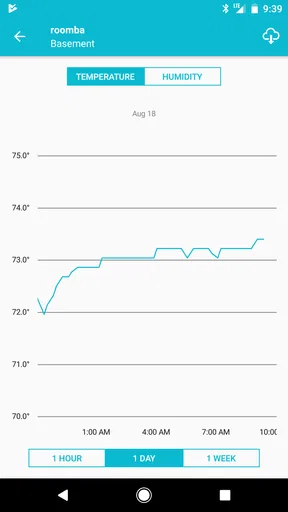
For the tech enthusiasts out there, La Crosse View offers a detailed look at the data collected by your weather station. You can access historical data and see trends over time, which is pretty cool if you're into analyzing weather patterns.
The app supports multiple devices, so if you have several weather stations, you can monitor them all from within the app. This makes it incredibly convenient for those managing weather stations across different locations.
Reading the data with a purpose
Historical readings are most valuable when I use them to compare like with like. For example, checking the same station at roughly the same time over several days can help me notice a local pattern that a single glance would miss. I would avoid treating a short run of readings as a formal climate record, but the history can still answer ordinary questions: whether a sheltered spot tends to stay warmer, or whether conditions have shifted since I last checked. That is a more grounded use than opening charts just to browse numbers.
When there are stations at multiple places, I would give each one a clear mental role—home, a regular work site, or another property—before comparing readings. A difference between locations can be informative, but it does not necessarily mean the equipment is inconsistent; the stations may simply be exposed to different surroundings. This is a small but important interpretation tip. Readings become more useful when I remember where the station is mounted and what that location can represent.
Hands-free access can suit moments when opening the app is awkward, such as while cooking or getting ready to leave. I would still use the phone when I need to inspect details or compare devices, since a spoken summary is naturally a quicker check rather than a substitute for looking through readings. The voice-assistant connection is a convenience, not the main reason I would choose this app; the station connection is what makes it distinct.
Compatibility, cost, and expectations
The app is free to install, but it includes in-app purchases priced from $1.99 to $29.99 per item. I would separate that from the bigger buying decision: the app is a companion to La Crosse hardware, so anyone starting from scratch should consider the station and the app as a setup rather than assume the download alone provides local measurements. The app is rated for Everyone, and it has been available since August 25, 2017. Its current Android version is 2.1.17-38543088 and requires Android 6.0 or later.
Its store average is 2.8 from around 15,000 ratings, with about 7,600 written reviews, and it has passed 500,000 installs. I take that as a reason to go in with practical expectations rather than assume every setup will feel effortless. Connection-dependent apps can be frustrating when pairing or remote access does not behave as expected, and that friction matters more here than it would in a stand-alone forecast app. La Crosse Technology is the developer, so this is the company’s own companion for its weather equipment.
If you are deciding whether it belongs on your phone, the key question is simple: do you want to see information from a La Crosse station you own? If yes, the app can make that equipment easier to check around your routine, especially when you are away from the display. If no, a conventional weather app is likely the simpler choice. I would also skip it if you need a dependable forecast for travel but have no interest in maintaining a connected station; its particular strength is local station access, not being an all-purpose replacement.
Final Thoughts
So, what's the verdict? La Crosse View is a solid choice for anyone who owns a La Crosse weather station. It’s user-friendly, packed with features, and offers a level of convenience that makes weather tracking not just easy, but actually enjoyable.
Whether you’re a weather enthusiast or just someone who likes to keep a close eye on the skies, this app offers everything you need to stay informed. So, if you haven't already, give La Crosse View a try. You might just find yourself checking the weather more often than you ever thought you would!
With the option to download from both Android and iOS, it’s accessible to just about everyone. Happy weather watching!
Verdict
Strengths of La Crosse View
- User-friendly interface for easy navigation.
- Real-time weather updates and alerts.
- Customizable dashboard for personal preferences.
- Seamless integration with smart devices.
- Reliable and accurate data display.
Limitations of La Crosse View
- Limited international location support.
- Occasional lag in data synchronization.
- Requires constant internet connection.
- Ads can be intrusive at times.
- Some features behind a paywall.
Similar Picks in This Category
View All
Weather - By Xiaomi
Xiaomi Inc.4.1

Weather & Radar Forecast
WetterOnline4.8

Weather
OneLouder Apps4.6

AccuWeather: Weather Radar
AccuWeather3.6

The Weather Channel - Radar
The Weather Channel4.6

1Weather Forecasts & Radar
OneLouder Apps4.3
Frequently Asked Questions
What is La Crosse View and how does it work?
La Crosse View is a smart weather station app designed to provide users with real-time weather updates and forecasts. By connecting to compatible La Crosse weather devices, the app offers detailed insights into temperature, humidity, and other weather conditions. Users can customize alerts and view historical weather data directly from the app.
Is La Crosse View compatible with all devices?
La Crosse View is compatible with both Android and iOS devices, but it requires specific La Crosse weather stations to function fully. Users should ensure their weather station model is supported by checking the compatibility list on the app’s description page or the official La Crosse website.
Does La Crosse View require a subscription or additional purchases?
The La Crosse View app itself is free to download and use. However, additional features or premium services might be available for purchase within the app. It's important to review any in-app purchases to understand what additional functionality is offered and at what cost.
How user-friendly is La Crosse View for first-time users?
La Crosse View is designed with a user-friendly interface that makes it accessible for beginners. The setup process is straightforward, with guided steps to connect the app to your weather station. The app provides clear visualizations of weather data, making it easy to navigate and customize according to user preferences.
What are the main benefits of using La Crosse View?
La Crosse View offers numerous benefits, including real-time weather monitoring, customizable alerts, and historical data tracking. It enhances the functionality of La Crosse weather stations by providing remote access to weather information, making it ideal for users who want detailed and accurate weather data at their fingertips.
